
How to hide the QSpace icon in the system status bar?
QSpace Settings > Behaviors > Status Bar
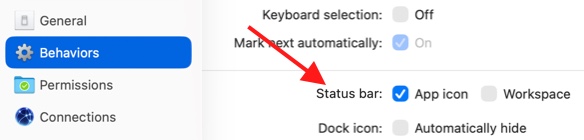
App icon Toggle the display of the QSpace icon in the status bar.
Workspace Toggle the display of the workspace name in the status bar.
QSpace Settings > Behaviors > Status Bar
App icon Toggle the display of the QSpace icon in the status bar.
Workspace Toggle the display of the workspace name in the status bar.