
Search
Search in Pane
Quickly filter or search within a pane. Default hotkey: Command + F.
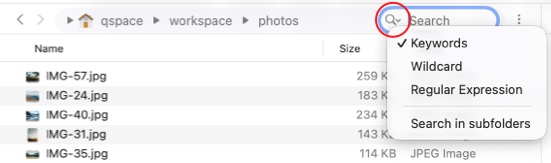
Keywords File names must contain the entered keyword(s). Spaces separate keywords; all must be present for a match.
Wildcard File names must match the entered wildcard pattern. For example: * matches any sequence of characters, and ? matches any single character.
Regular Expression File names must match the entered regular expression.
Search in subfolders Include subfolders when performing the search.
Spotlight Search
Only supports local files and requires the system's Spotlight index to be enabled.
Default hotkey: Option + Command + F.
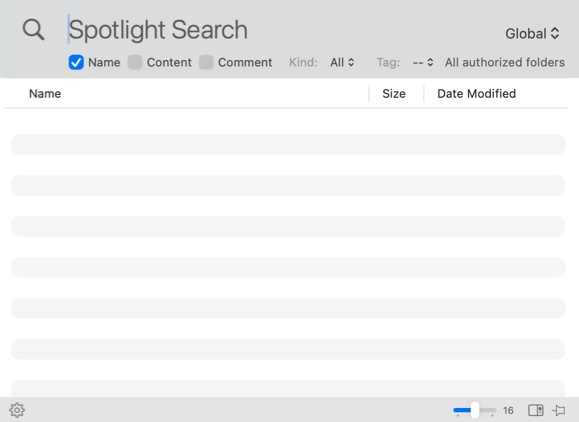
Global Defaults to searching the entire disk. You can limit the search to the workspace or a specific folder.
Name Match file names.
Content Match file contents.
Comment Match Finder comments of files.
Kind Limit matches to specific file types.
Tag Limit matches to files with specific tags.
Icon size The size of file thumbnails.
Preview Display a file preview on the right side.
Pin Click to toggle the window display state. Gray: The search window auto-hides. Blue: The search window stays open and must be closed with ESC or Command + W. Yellow: The search window stays on top.
Spotlight Search Options
QSpace Settings > Spotlight Search
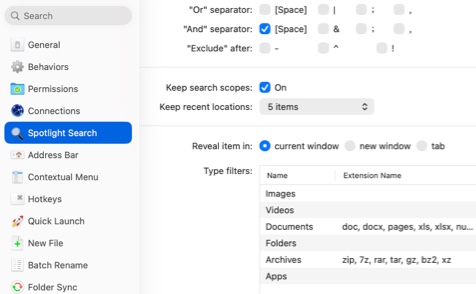
Or separator Keywords separated by this symbol require a match with any of the sub-keywords.
And separator Keywords separated by this symbol require a match with all sub-keywords.
Exclude after Results must not contain the keyword prefixed by this symbol.
Keep search scopes Retain the last selected search scope when reopening the search window.
Keep recent locations Set the number of recently used search locations to remember.
Reveal item in When opening a folder or file from the results, choose to use the Current Window, New Window, or New Tab.
Type filters Filter by a custom list of extensions (separated by commas) or Uniform Type Identifiers to match files.