
Quick Launch
Options
QSpace Settings > Quick Launch
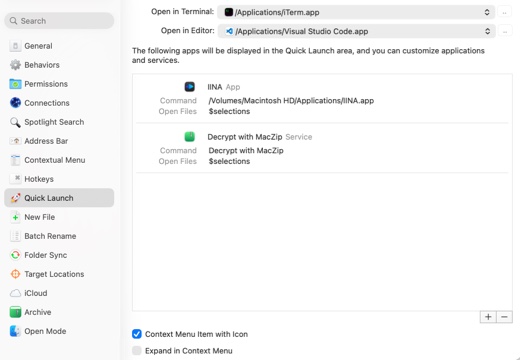
Open in Terminal Select a terminal application.
Open in Editor Select an editor application.
Show Icons in Context Menu Whether to display icons for Quick Launch items in the context menu.
Expand in Context Menu Whether to expand Quick Launch items directly in the context menu or display them within a submenu.
New
Click the + button to open the creation panel.
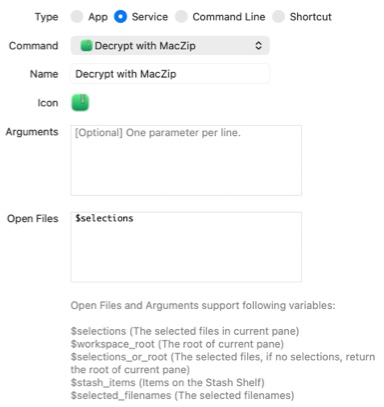
Type Select App, Service, Command Line, or Shortcut as the launch item type.
Command Choose the corresponding item for the selected type.
Name The name of the Quick Launch item.
Icon The icon for the Quick Launch item.
Arguments Parameters for launching the App, Service, Command Line task, or Shortcut.
Open Files File parameters to be opened by the App or Service.
Built-in Variables Insert these variables into Arguments or Open Files to pass file paths from QSpace to third-party applications.