
Colorful
Options
QSpace Settings > Colorful. Click the + button below to create a new rule.

Colorize files and folders by rules Whether to enable color coding.
Ignore when item is selected Whether to apply color coding to selected items.
Coloring rules are mutually exclusive Whether to mix multiple matching rules when coloring items.
Rule
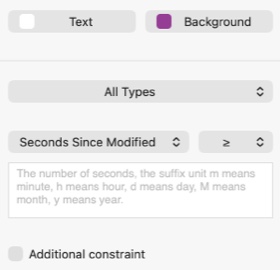
Text Select the text color for matching files.
Background Select the background color for matching files.
Type Filter matches by item type.
Name ← Matches the beginning. → Matches the end. →← Contains. = Equals. Regex Matches a regular expression.
Extension Specify a set of extensions to match.
Size Filter matches by file size. E.g., > 1G matches files larger than 1 GB.
Modified Ago Filter matches by time elapsed since last modification. E.g., > 1h matches files modified more than 1 hour ago.
Created Ago Filter matches by time elapsed since creation. E.g., > 1d matches files created more than 1 day ago.
Added Ago Filter matches by time elapsed since being added. E.g., > 30m matches files added more than 30 minutes ago.
Width Filter matches by image or video width. E.g., > 1080 matches files with a width greater than 1080 pixels.
Height Filter matches by image or video height. E.g., > 960 matches files with a height greater than 960 pixels.
Duration Filter matches by video or audio duration. E.g., > 1m matches files longer than 1 minute.
Additional constraint Requires both conditions to be met for a match.