
Advanced Batch Rename
This is an extension, available for purchase as needed.
Supports live preview of changes, allowing you to freely combine naming formats—including custom sequences, dates, music tags, image metadata, and other elements. Perform multiple text operations such as addition, replacement, and removal, with full support for regular expressions. Save and load preset rules for reuse, and every batch operation is automatically logged in a rename history for easy review.
Start
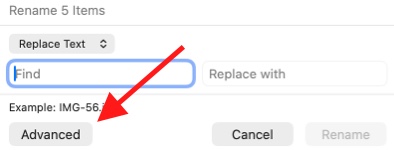
Select multiple items and press Enter to batch rename, then click Advanced.
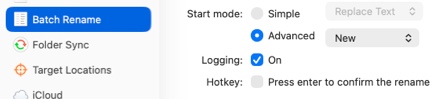
In QSpace Settings > Batch Rename > Startup mode, select Advanced to launch Batch Rename directly into Advanced Mode.
Quick Rename Save a renaming rule from Advanced Mode as a preset. It can be quickly launched via the Context Menu or the Sidebar.
Rules
In QSpace Settings > Batch Rename, click the + button at the bottom to create a new renaming rule.
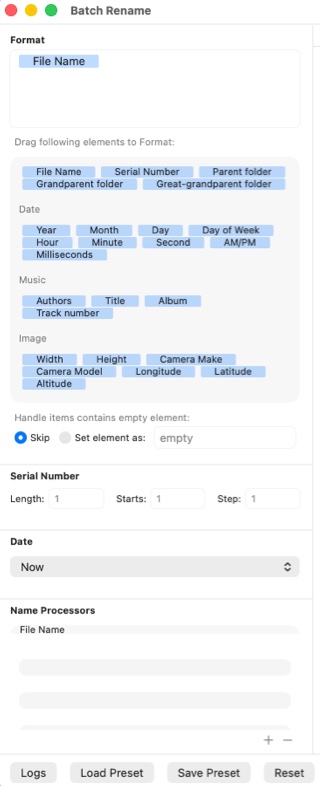
Format The formatted file name, consisting of entered characters and file attribute elements.
Handle items contains empty elements If an element in the format is empty, you can choose to skip this file's format or assign a placeholder string for the empty element.
Sequence Customize the length, starting value, and increment of the sequence number element.
Date Select the specific date for date-related elements.
Name Processor · File Name Process the original filename. Supports operations such as Add Text, Replace Text, Remove Text, Change Case, Range, and Manual Input.
Name Processor · Formatted Name Process the resulting name generated by the format.
Duplicate Name Add Suffix to append a custom suffix to duplicate filenames.
Extension Change the file extension.
Load Preset Load a saved Batch Rename rule.
Save Preset Save the current Batch Rename rule as a preset.
Reset Reset the current Batch Rename rule.