
Enhanced Archiver
This is an extension, available for purchase as needed.
Browse archives directly, just like folders! Powered by the built-in MacZip engine, you can compress files into ZIP or 7Z format with support for encryption and splitting. Extract over 20 common archive formats, including rar, zip, 7z, tar, gz, bz2, xz, lzma, and lz4.
Create Archive
QSpace Settings > Archive > Create Archive
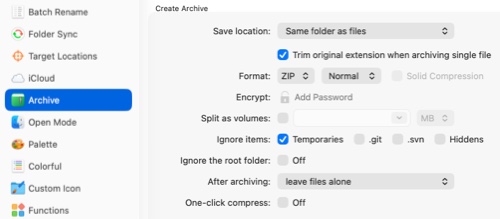
Save Location Where to save the created archive.
Omit original extension for single files E.g., compressing image.png results in image.zip.
Format Supports ZIP and 7Z formats.
Encrypt Whether to encrypt the archive.
Split into Volumes Whether to split the archive into multiple volumes.
Ignore items Choose to ignore Temporaries (.DS_Store and __MACOSX), .git, .svn, and Hiddens when creating the archive.
Ignore root folder When compressing a folder, whether to include only its contents.
After archiving Whether to keep the original files after compression.
One-click compress Whether to skip the settings panel when compressing.
Open Archive
QSpace Settings > Archive > Open Archive
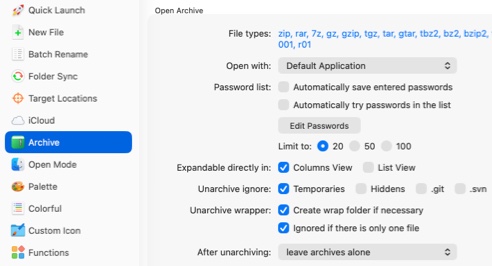
File types Customize the list of archive extensions to open with QSpace.
Open with Choose how to open archives in QSpace: with the system's Default Application, via Preview in QSpace, or via Decompress i nQSpace.
Password list Set to Automatically try passwords in the list to auto-decrypt archives.
Expandable directly in Choose to expand archives as folders in Columns View and List View.
Unarchive ignore Choose to ignore Temporaries (.DS_Store and __MACOSX), .git, .svn, and Hiddens when extracting.
Unarchive wrapper Choose to Create wrap folder if neccessory if the archive has no root folder, and Ignore if there is only one file.
After unarchiving Whether to keep the archive after extraction.